Posts

Showing posts with the label digital citizenship

Google Chrome - Using the Profile Menu
Image
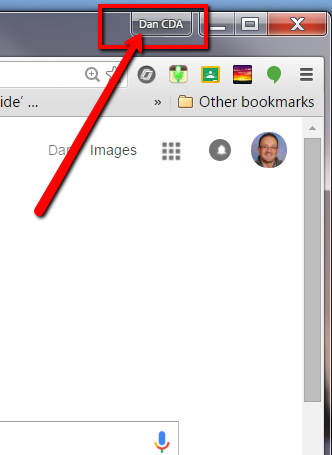
So, It's been a long time since my last post. I had a busy summer and the start of this school year has been the busiest that I can remember, which makes things go quickly. But in the spirit of the split lives that teachers live, here is a quick guide on using Chrome profiles to manage the important separation that teachers work to maintain between home and school. Why use Chrome Profiles? Chrome allows a user to create separate browser profiles for each google account. This allows users to keep work, school, and/or personal accounts all separate, but still use them at the same time. They will operate independently with their own settings, bookmarks, extensions and more.  In other words, there is no need to switch between accounts anymore – all of them can be open at the same time. *In addition, Add-Ons in Google Drive work better when profiles are kept separate (like Goobric). Set Up Profiles: Sign in, or see who is signed into Chrome: When Google Chrome is first o...

Guest Spot on Idaho EdTech 1.1 #digcit

Image
Last week, I was asked to be a guest on the premiere show of IdahoEdTech. It is a Google hangout show that is put on by Sarah Windisch (from Post Falls School District) and Simon Miller (from Kellogg School District). The topic was digital citizenship and we discussed issues surrounding this topic for students and staff of all ages and why it is important to cover digital citizenship in schools today. Here is the video on YouTube. Check back for more shows in the future!

Resources for Teaching Digital Citizenship

One of the many parts of my job as an instructional technology coach is to design professional development programs for teachers and students in my district. One of the most recent programs that I'm working to develop is a digital citizenship course for a 6th grade exploratory class at our district middle schools as well as a short introduction to digital citizenship for our staff. In addition, April is National Child Abuse Prevention Month and because of that, I felt that this topic would be timely and appropriate. Digital citizenship is something that I believe all teachers should address on some level in all classes.  Students need to be given tools to help prevent their own good intentions from exposing them to harm. However, it is most often neglected in classes due to pressures of curriculum, time, and even a lack of knowledge or resources on the part of the teacher (to no fault of their own - teachers are incredibly overburdened with so much during this time of trans...

A Google a Day

Image
One major topic that I've spent a lot of work time on the last few weeks is Digital Citizenship. I've been working on creating a course for students as well as a quick introduction for staff to bring these essential ideas into the forefront of our students' (and teachers') minds as we embark on the implementation of the Idaho Core. Part of my research has led me to an idea that I've taught my students in the past, and work with other teachers on using in the classroom, which is effective search skills with search engines. Whether a person is using Google, Yahoo, Bing, or any other search engine, knowing how to cipher through the list of results and find things that are relevant and useful can be a chore. One thing that I've found through my own searching and through suggestions by others (thanks  +Jeff Utecht /@jutecht and a reminder from a teacher in my district @117rocks) is A Google a Day . This search game can act as a great way to start a class or reinfor...